A voice studio for Windows. It runs on your PC, not in the cloud.
Type a dialogue. Hear it in Marathi, Hindi or English.
Give each speaker a voice, press Generate and save an MP3. Everything runs on your own computer, even an older one, so there is no per-character bill and your scripts stay with you.
7-day full trial with every feature, no card needed. Paid plans remove the daily limit.
SayvexaTTS– ☐ ✕
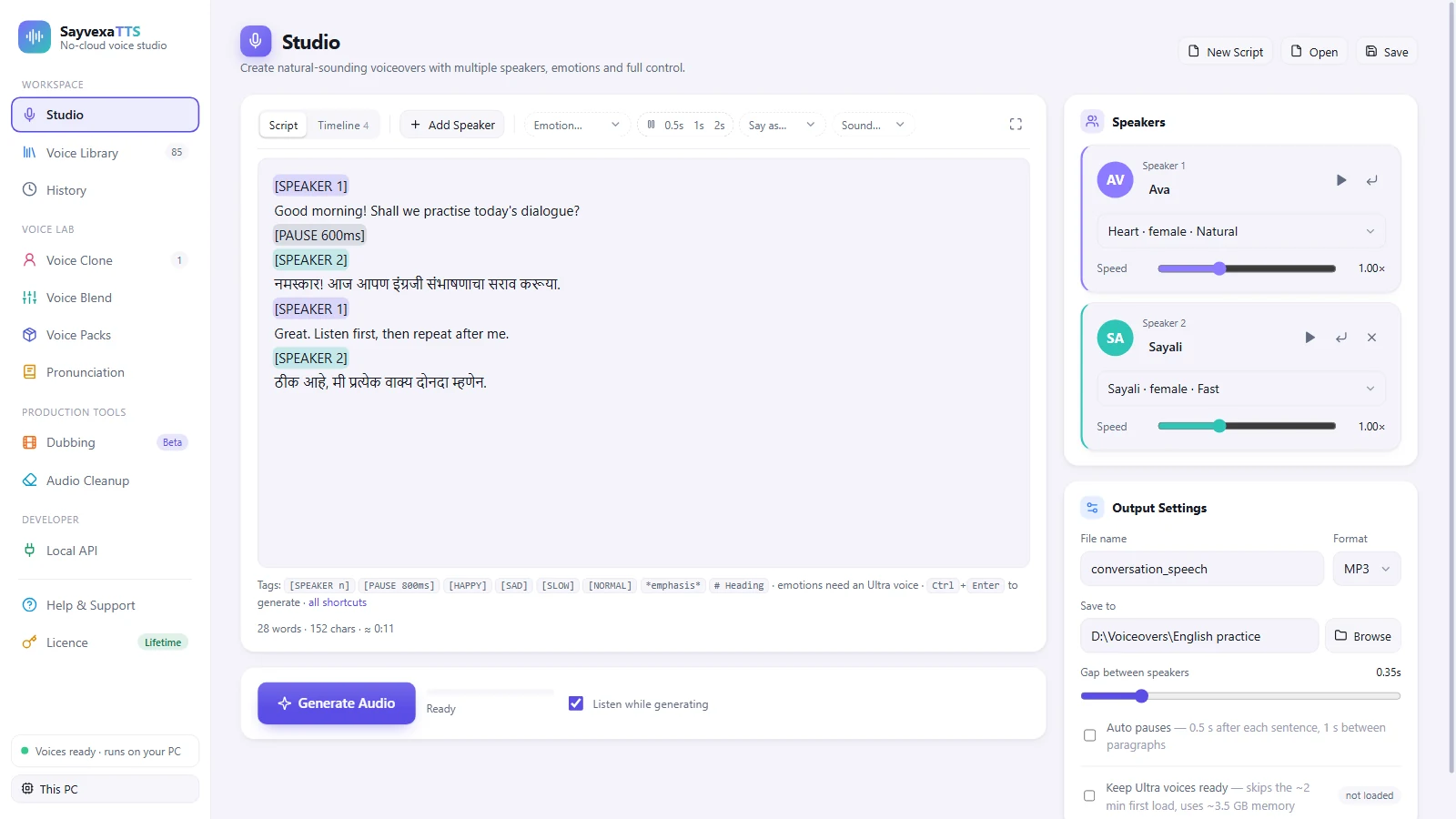
An English-practice script: Ava reads the English lines and Sayali answers in Marathi, “नमस्कार! आज आपण इंग्रजी संभाषणाचा सराव करूया.”
Everything included
What you can make with it
Every feature is unlocked in your 7-day trial. No separate packs to buy to get started.
Voice Studio
Write multi-speaker scripts, set speed per speaker, preview line by line. Script and Timeline view included.
Voice Clone
Make a voice from a 3–15 second recording (record up to 20 s and trim). Three quality levels: Normal, High quality with the Ultra pack, and Studio Beta, which also copies the speaking style (Hindi, English and 17 more languages).
Voice Blend
Mix up to four voices or smooth-blend two for a voice no model ships. Save and reuse your blends.
Video Dubbing Beta
Auto-transcribe, translate and re-speak a video in Marathi, Hindi or English. Exports MP4 + SRT. Needs two free packs (2.5 GB).
Audio Cleanup
Remove fan noise, street noise and wind from any recording. Five presets; the voice enhancer is an optional pack.
Pronunciation List
Define exactly how names, brands and technical terms are spoken. Used everywhere: Studio, Dubbing and the API.
Local REST API
OpenAI-compatible endpoint at 127.0.0.1. Streaming, WAV and JSON responses. No internet, no API key to pay for.
No graphics card needed
Every feature runs on your processor, also on older PCs. GPU acceleration is planned for a later update.
Voice quality tiers
Three kinds of voices
Natural and Fast voices are free downloads inside the app; Ultra is an optional pack. No extra cost per use.
Natural
54 voices · 9 languages · Free download
Best for English narration
American & British English, Spanish, French, Hindi, Italian, Japanese, Portuguese, Mandarin
About real time on an older 2-core CPU, faster on modern PCs · 330 MB
Speed 0.5×–2.0×
Fast
4 voices · Marathi & Hindi · Free download
Light Marathi & Hindi voices
Marathi: Sayali ♀, Aditya ♂
Hindi: Meera ♀, Arjun ♂
Small and light, runs on any PC · 430 MB
Ultra
25 voices · Marathi, Hindi, Indian English · Optional pack 1.8 GB
Best for expressive Indian voices
Expression and style tags in the script
Slow on older CPUs (about 26 min per minute of speech on an older 2-core CPU); faster on modern CPUs
Time estimate shown before you generate
System requirements
Will it run on my PC?
Natural and Fast voices run on almost any Windows PC. After installing, the app downloads the voices you choose once; then everything runs on your PC. Heavier features are optional packs, so you only download what your PC can handle. Before you generate, the app shows an estimated time for your own PC.
SystemWindows 10 / 1164-bit
ProcessorAny x86-64 CPUNo AVX2 needed · older CPUs work
Memory4 GB RAM8 GB recommended
DiskAbout 2 GBApp 1.1 GB + Natural & Fast voices 0.8 GB; other packs extra
InternetOnce, for setupTo download voices · licence check every 30 days
Feature
Download
Memory
Processor
Graphics card
Natural voicesEnglish + 8 more languages
Free download in the app · 0.33 GB
4 GB
Any · about real time on a 2-core older CPU
Not needed
Fast voicesMarathi, Hindi
Free download in the app · 0.43 GB
4 GB
Any · about 1.7 min per minute of speech on a 2-core older CPU; quicker on modern CPUs
Not needed
Voice Clone — Normalfrom a 3–15 s recording
Free download in the app · 0.13 GB
4 GB
Any · adds about 2× the speech length on a 2-core older CPU
Not needed
Ultra voicesalso Voice Clone — High quality
Optional pack · 1.8 GB
8 GB (6 GB minimum)
Modern 6–8-core recommended · works on older CPUs, slowly
Not needed
Voice Clone — Studio Betacopies the speaking style · Hindi, English + 17 more
Optional pack · 5 GB
8 GB
Modern 8-core recommended · on older CPUs a sentence can take several minutes
Not needed
Dubbing Betavideo → Marathi, Hindi, English
Speech recognition 1.5 GB and/or Indian speech recognition 2.4 GB (best for Marathi, Hindi) + Translation 1 GB
6 GB (8 GB recommended)
Any · speaking time depends on the voice chosen
Not needed
Audio Cleanupnoise, wind, voice enhancer
Free download in the app · 0.01 GB · enhancer optional 0.71 GB
4 GB · enhancer about 3 GB free
Any
Not needed
No graphics card is needed: version 1.0 runs every feature on the processor. GPU acceleration is planned for a later update. Speeds are measured on our low-end test PC (2-core Intel Core i3, 6 GB RAM, no GPU); newer PCs are faster.
Why no cloud
Your data stays on your PC
No subscription to speak. No character meter ticking up. No audio sent to a third-party server.
Cloud TTS
✗Needs internet for every word generated
✗Pay per character, so the bill grows with use
✗Your script is sent to a remote server
✗Slow or unavailable in weak-network areas
✗Price changes at the provider's discretion
SayvexaTTS
✓Runs on your PC. After the one-time voice download, no internet is needed to generate
✓Flat licence fee, never a per-character cost
✓Your scripts never leave your PC
✓Runs on baseline x86-64, older CPUs too (no AVX2 required)
✓Works equally fast regardless of your internet connection
✓Lifetime option: pay once, no renewals
Pricing
Start free, pay when you need more
Every feature is fully unlocked for 7 days. After that, keep using for free with limits, or upgrade for unlimited generation.
Launch offer: introductory prices for our first release
Not sure yet? Download SayvexaTTS and use every feature free for 7 days, no payment needed. Try it first → The price shown is the full amount you pay. No tax is added at checkout. Already paid and cannot find your code?
✓ Voice Clone — Normal, High quality and Studio (Beta)
✓ Dubbing + Audio Cleanup
✓ Local REST API
✓ All export formats
Yearly
Save 44% vs monthly
₹1,999/yr
About ₹167 a month · renew once a year
✓ Everything in Monthly
✓ Renew once a year
✓ Lower per-month cost
✓ Commercial use licence
✓ 1 PC per licence
✓ Move to a new PC on request
Lifetime
Same as 2.5 years of Yearly
₹4,999
Pay once · use forever
✓ Everything in Yearly
✓ No renewal needed to keep using it
✓ Free updates for 1 year
✓ Commercial use licence
✓ Runs on your PC (quick licence check online every 30 days)
✓ 1 PC per licence
One licence works on one PC, and we move it to a new PC on request. UPI, debit and credit cards accepted.
Download
Free to try on Windows
Download the installer, run it, and open SayvexaTTS from the Start menu. The 7-day full trial begins the first time you open the app. No payment details needed.
▸ Windows 10 or Windows 11, 64-bit
▸ 4 GB RAM minimum, 8 GB recommended
▸ Any x86-64 CPU, no AVX2 required
▸ About 2 GB free disk for the app with Natural and Fast voices
What's new in 1.0.2
Studio voice cloning (Beta): cloned voices that also copy the speaking style, in Hindi, English and 17 more languages. Choose Calm, Natural or Expressive for each voice.
Indian speech recognition: a new optional pack that writes Marathi, Hindi and 20 more Indian languages much more accurately, for dubbing and cloning.
A Start over button on every page that makes audio, so you can begin again without restarting the app.
[PAUSE 0.5] now works without "s" or "ms".
The Dubbing page fits better on small or zoomed screens.
After installing, download the voices you want once on the Voice Packs page.
Natural and Fast voices first; Ultra, Dubbing and other packs only if you need them.
"Windows protected your PC"? The installer is not code-signed yet. Click More info → Run anyway. Install guide
Common questions
Questions, answered
Licences, offline use, older PCs and voice cloning. Something missing? Write to us.
Yes. After you install and activate the app, all voice generation, cloning and dubbing run entirely on your PC. No audio is sent anywhere. You need internet to activate your licence, to download the voices once, and for a quick licence check at least once every 30 days. If the PC stays offline longer, the app keeps working in free mode until it is online again.
The app keeps working in a free mode with limits: 2,000 characters a day, Natural and Fast voices, MP3 export, and more. Your scripts, voices and history are never deleted. Upgrade any time to remove the limits.
Yes. SayvexaTTS is built for baseline x86-64, so it runs on older CPUs, with no AVX2 instruction set needed. The Natural and Fast voices work on a dual-core CPU with 4 GB RAM. Ultra voices are slower on older hardware but produce the same quality output. See System requirements.
You can clone a voice from a 3–15 second recording (you can record up to 20 seconds and trim it). You must have the person's consent before cloning their voice. Cloned voices are stored locally on your PC and are never uploaded. Cloned voices speak Marathi, Hindi and English; Studio cloned voices (Beta) also copy the speaking style and speak Hindi, English and 17 more languages, but not Marathi. For the best clone use a clean recording without echo or music.
Yes. A Lifetime licence never expires: the version you have keeps working on your PC for good. Like every licence it needs a quick online check at least once every 30 days. It includes free updates for 1 year from the day you activate it. After that you keep using your version for good; versions released after that year are not included.
Buy a plan again and enter the new code on the same PC. A Monthly or Yearly code adds its time after your current period ends, so no days are lost; a Lifetime code makes the PC Lifetime from that day. Your earlier code stays valid on that PC. Each code works on one PC only.
Yes, on any paid plan. You can use the generated audio in YouTube videos, podcasts, e-learning courses, client projects and other commercial work. Free-mode output is for personal, non-commercial use only.
Each licence covers 1 PC. Contact us and we will release your old PC so you can activate the new one. Self-service release is on the roadmap.
Support
Questions? Write to us
Licence, payment, a technical problem or an idea: send a message and we reply by email.